Secure Server Access Without SSH Keys: Understanding Outbound Agent Architecture
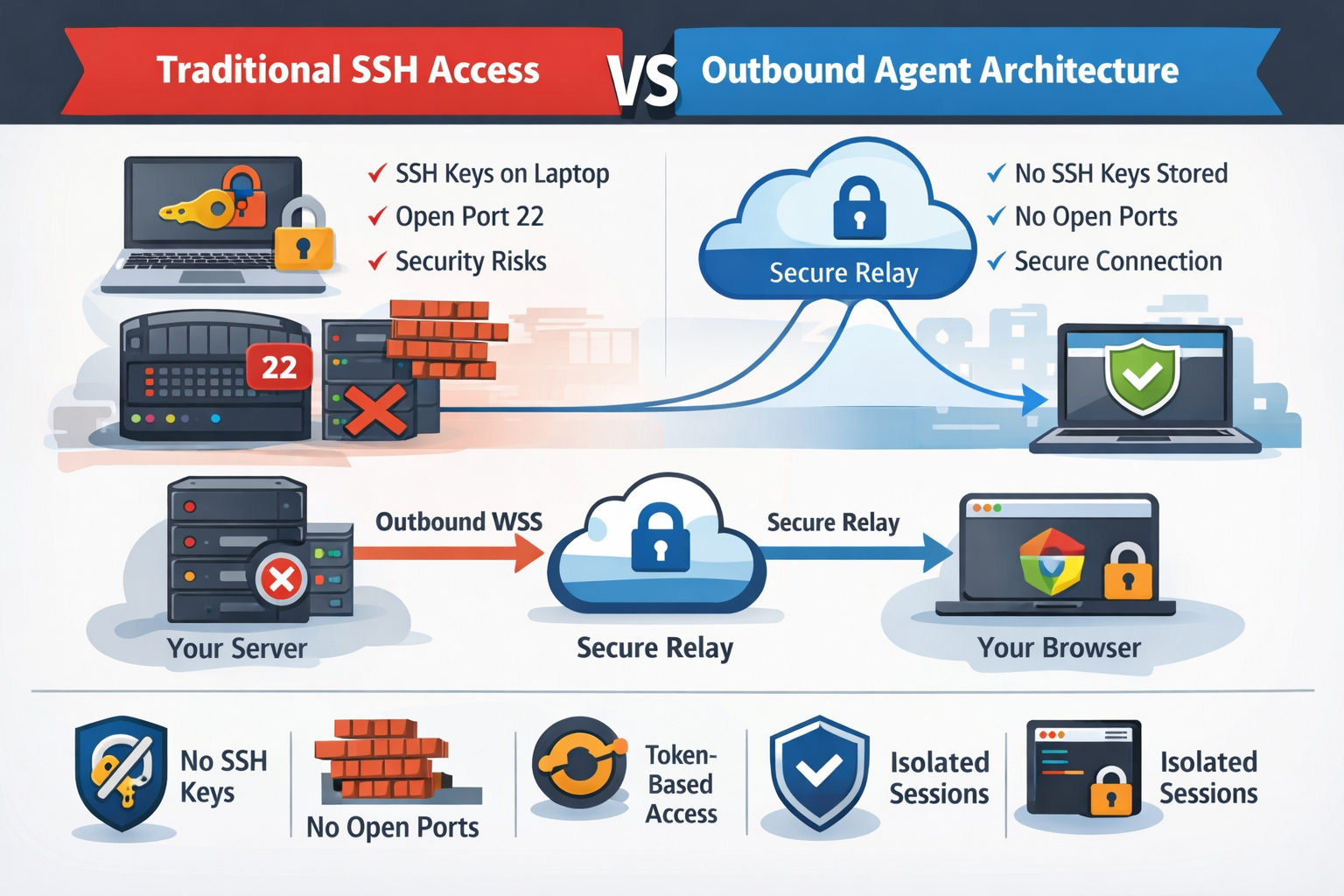
If you've ever managed a server, you know the drill: generate SSH keys, copy the public key to the server, protect the private key with your life, and pray nobody compromises your laptop. It works, but it's a security model built on trust—trust that your keys won't leak, trust that your laptop won't get stolen, and trust that you'll remember to revoke access when team members leave.
There's a better way. Outbound agent architecture flips the traditional model on its head. Instead of you connecting into your server, your server connects out to a secure relay. No SSH keys stored anywhere. No firewall ports to open. No attack surface to worry about.
The Problem with Traditional SSH Access
SSH has been the backbone of server administration for decades, and for good reason—it's encrypted, battle-tested, and universally supported. But it has inherent security challenges:
- Key management nightmare: Every developer needs their public key on every server they access. When someone leaves the team, you need to remove their key from every single machine.
- Exposed ports: SSH typically runs on port 22 (or a custom port), which means that port is visible to the entire internet. Bots constantly probe for weak passwords.
- Private key risk: If someone's laptop is compromised, their private key can be extracted. One breach, and an attacker has access to every server that key touches.
- No audit trail: Standard SSH logs who connected, but not necessarily what they did. Session recording requires additional tooling.
How Outbound Agent Architecture Works
CLI Pal uses a lightweight Python agent that you install on your server. Here's the key insight: the agent initiates all connections. It opens an outbound WebSocket Secure (WSS) connection to CLI Pal's servers—the same kind of connection your browser makes when you visit any HTTPS website.
Your Server → Outbound WSS → CLI Pal Relay → Your BrowserThis architecture has profound security implications:
1. No Inbound Ports Required
Your server's firewall can block all inbound connections. The agent only needs outbound access to port 443, which is almost always open (it's the same port used for HTTPS). Attackers scanning your IP will see nothing—no SSH port, no management interface, nothing to exploit.
2. No SSH Keys to Manage
Authentication happens at the CLI Pal layer, not on the server itself. When you add a server to your dashboard, you generate a one-time install token. The agent uses this token to establish trust. After that, your login to CLI Pal (email + password + optional 2FA) is what grants access. Revoke a user's CLI Pal access, and they immediately lose access to all servers—no need to SSH into every machine.
3. Token-Based, Per-Server Authentication
Each server has its own unique agent token. If a token is somehow compromised, only that single server is affected, and you can rotate the token instantly from the dashboard. Compare this to SSH: if your private key leaks, every server trusting that key is exposed.
4. Session Isolation
The terminal session runs on your server, but the connection is brokered through CLI Pal's relay. Your commands never touch our systems—they're relayed in real-time over the encrypted WebSocket. We see metadata (connection times, data volumes), but not the actual content of your sessions.
The Installation Flow
Setting up a server with CLI Pal takes about 60 seconds:
- Add a server in your dashboard and generate an install token
- Run the one-liner on your server:
curl -sSL https://clipal.me/install.sh | sudo bash -s -- --token=YOUR_TOKEN - The agent installs, registers with CLI Pal, and opens the WSS connection
- Your server appears as "online" in the dashboard—ready to use
That's it. No generating keys, no editing ~/.ssh/authorized_keys, no configuring sshd_config. The agent runs as a systemd service, automatically reconnects if dropped, and updates itself when new versions are available.
Security Comparison: SSH vs. Outbound Agent
| Aspect | Traditional SSH | CLI Pal Agent |
|---|---|---|
| Attack surface | Open port (22 or custom) | No inbound ports |
| Key management | Manual key distribution | Centralized token auth |
| Access revocation | Edit each server manually | One-click in dashboard |
| Compromised laptop | All servers at risk | Revoke session instantly |
| Network requirements | Inbound port open | Outbound 443 only |
When You Might Still Need SSH
We're not saying SSH is obsolete. There are scenarios where direct SSH is necessary:
- Offline/airgapped systems: If a server can't reach the internet at all, the agent can't connect.
- Emergency recovery: If CLI Pal's relay is somehow unreachable, you need a fallback. Keep SSH as a break-glass option, but restrict it to a bastion host or VPN.
- Automation: CI/CD pipelines often use SSH for deployments. CLI Pal is designed for interactive access, not scripted automation.
The ideal setup? Use CLI Pal for day-to-day administration and keep SSH locked down for emergencies—maybe accessible only from a specific IP or through a VPN.
Getting Started
If you're tired of SSH key sprawl, worried about exposed ports, or just want a simpler way to manage your servers, give CLI Pal a try. The agent is open-source, the install takes a minute, and you can start with a single server to see how it feels.
View pricing or read the quick start guide to get your first server connected today with 50% discount.